

The Formuler Z series is one of the most remarkable Android boxes for IPTV. It offers a great combination with Xtreme HD IPTV, which provides buffer-free 4K stream, powerful performance, and an intuitive interface. However, the main highlight of this Android box is that it already has a pre-installed MYTVOnline app, which is specially designed for Formuler devices and supports all sorts of IPTV connections. Nevertheless, this guide will provide you with a detailed description of the installation process.
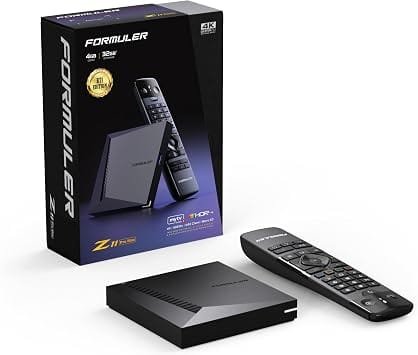
Why Choose Formuler Z Series for IPTV
- Dedicated IPTV Player: MYTVOnline is pre-installed, optimized, and regularly updated.
- Multiple Connection Methods: Supports Portal (MAC), Xtreme Codes (XC), and M3U Playlist.
- High-End Performance: 4K HDR, Dolby Vision/Atmos, fast processors, and ample storage.
- User-Friendly Interface: Simple menu navigation and deep customization options.
What You Need Before Starting
- A Formuler Z Series box (Z10, Z11 Pro, Z11 Pro Max, or Z12 Ultra)
- An active Xtreme HD IPTV subscription
- Your subscription details (one of these three):
- Xtreme Codes: Username, Password, and Server URL
- MAC/Portal: MAC address and Portal URL
- M3U Playlist: Direct playlist URL (and optional EPG URL)
- A stable internet connection (Ethernet recommended for 4K)
- HDMI cable and TV
Step 1: Initial Box Setup
- Connect Hardware: Plug HDMI into your TV and Formuler box. Connect Ethernet for wired internet or use Wi-Fi later.
- Power On: Plug in the power adapter and turn on your TV. Select the correct HDMI input.
- Pair Remote: For BT1/BT3 voice remotes, hold Home + OK for 5 seconds until the LED flashes blue. For IR remotes, insert batteries.
- Connect to Internet: Go to Settings > Network & Internet > Wi-Fi (if not using Ethernet) and select your network.
- Sign in to Google: Follow prompts to log in to your Google account for Play Store access.
Step 2: Set Up Xtreme HD IPTV in MYTVOnline
Option A: Xtreme Codes (Recommended)
This is the easiest and most popular method.
- Open the MYTVOnline app from the home screen.
- Go to Menu > Connections > Add Portal.
- Select Add Xtream or Xtreme Codes.
- Enter:
- Portal Nickname: e.g., “Xtreme HD”
- Portal URL: Your server address
- Username: Provided by Xtreme HD IPTV
- Password: Provided by Xtreme HD IPTV
- Ensure “Login required” is turned on.
- Click Connect. Your channel list will load automatically.
Option B: MAC/ID Portal (Stalker)
Use this if your provider uses MAC-based activation.
- Open MYTVOnline and note your MAC Address shown at the top right (e.g.,
00:1A:79:XX:XX:XX). - Provide this MAC address to your Xtreme HD IPTV provider for activation.
- Once activated, go to Add Portal in MYTVOnline.
- Enter a Portal Nickname (any name) and the Portal URL ( http://kytv.xyz/portalstb ) from your provider.
- Click Connect.
Option C: M3U Playlist URL
Use this if you have a direct playlist link.
- In MYTVOnline, go to Add Portal or choose the playlist option.
- Enter the M3U Playlist URL provided by your service.
- Optionally, enter the EPG URL for the TV guide.
- Click Connect.
Recommended Apps for Formuler Z Series
While MYTVOnline is your primary IPTV player, these additional apps enhance the experience:
| App | Purpose | How to Get |
|---|---|---|
| Downloader App by Aftv | Sideload apps Like Our Xtreme HD IPTV APP (Downloader Code=2629562) not on Play Store | Google Play Store |
| TiviMate | Premium IPTV player with advanced features | Sideload via Downloader |
| IPTV Smarters Pro | User-friendly multi-screen IPTV player | Google Play Store |
| NordVPN | Protects privacy and prevents ISP throttling | Google Play Store |
Troubleshooting Common Issues
| Issue | Solution |
|---|---|
| Connection Failed | Double-check URL, username, and password. Ensure no typos. |
| Channels Not Loading (MAC) | Confirm your provider registered your MAC address correctly. Reboot box. |
| Buffering / Freezing | Use Ethernet instead of Wi-Fi. Check internet speed (25+ Mbps for 4K). Use a VPN to avoid throttling. Reboot box weekly to clear cache. |
| No EPG Data | Ensure EPG URL is correct. Wait a few minutes for data to populate. |
Final Tips for Best Performance
- Use Wired Ethernet: Always prefer a wired connection for stable 4K streaming.
- Enable Hardware Acceleration: In MYTVOnline settings, turn on hardware decoding for smoother playback.
- Keep Firmware Updated: Regularly check for system updates in Settings > Device Preferences > About > System Update.
- Use a VPN: Protects your privacy and stops ISPs from slowing down your IPTV traffic.
Conclusion
Installation of the Xtreme HD IPTV on your Formuler Z Series only takes less than 10 minutes when using the MYTVOnline app. No matter what method you choose, Xtreme Codes, MAC portal, or M3U, the setup process is quick and easy, so you can start watching your favorite shows right away.
With the right tools and a few additional apps, you can stream your preferred channels in high definition with ease and have a nicely organized TV guide.
Enjoy your Xtreme HD IPTV experience!
