
Television has indeed evolved, now it is offered as IPTV comes over Cable TV , Gone are the days when viewers were limited to what their cable or satellite provider allowed. As of 2026, internet-delivered television has surpassed cable television as the dominant method of television distribution in many countries around the world. For Getting Subscription visit here
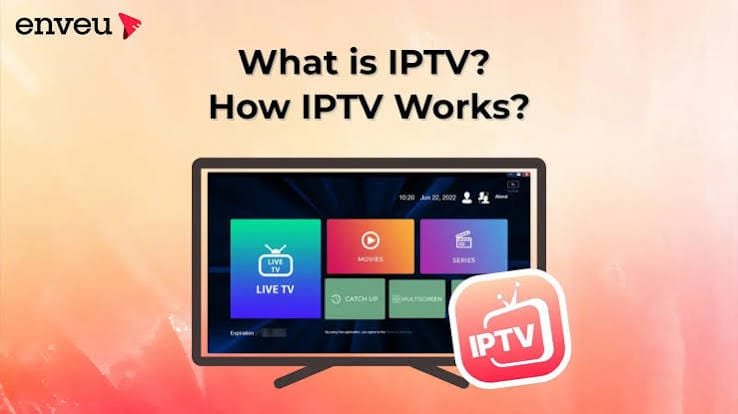
If you’re new to IPTV, this guide will explain everything you need to know in plain, simple language.
What is IPTV?
IPTV stands for Internet Protocol Television.
Simply explained, this is a method of watching television through an internet connection.
Rather than connecting to a TV antenna, satellite, or cable, IPTV uses the user’s broadband connection to deliver television programming to a television. The television is fed data packets that are assembled and displayed as video much like a YouTube video is streamed.
IPTV vs. OTT: What’s the Difference?
You may have heard the term OTT (Over-The-Top) streaming—services like Netflix, YouTube, or Disney+. Both IPTV and OTT deliver video over the internet, but there is a key difference:
| Feature | IPTV | OTT (Netflix, YouTube) |
|---|---|---|
| Network | Managed, private network | Public internet |
| Quality Guarantee | Provider controls and guarantees quality | Best-effort delivery |
| Content Type | Live TV + VOD | Primarily VOD |
| Example | Xtreme HD IPTV | Netflix, Hulu |
In practice, this distinction is becoming less rigid. Many IPTV services now blend both approaches, but the core idea remains: IPTV is optimized for live television with quality and reliability.
How Does IPTV Work?
IPTV uses two main methods to deliver content:
For Live TV (Multicast)
Live channels use a technology called multicast. Think of a water pipe, that splits into smaller pipes. Only where these splits happen, the network will send a copy of the video. That’s extremely efficient.
For On-Demand Content (Unicast)
When a user watches a film or television series on a particular streaming service, the client-server connection utilizes unicasting methods. It implies that the user receives an exclusive data stream, which allows for rewinding or pausing. The connection uses Adaptive Bitrate Streaming (ABS) method that lets the video adapt to the viewer’s bandwidth and switch to a lower resolution if the loading capacity is slow.
What Do You Need to Watch IPTV?
Getting started is simple. Here is what you will need:
1. A Stable Internet Connection
- Standard Definition (SD): 2–4 Mbps
- High Definition (HD): 8–20 Mbps
- 4K: 25+ Mbps
A wired Ethernet connection is ideal, but modern Wi-Fi works well too.
2. A Compatible Device
IPTV works on virtually every screen you own:
- Smart TV (Samsung, LG, Sony)
- Fire TV Stick / Android TV Box
- Smartphone or Tablet (iOS/Android)
- Computer (Windows/Mac)
3. An IPTV Player App
You will need an application to watch IPTV. Popular options include:
- TiviMate
- IPTV Smarters
- IBO Player
- Smart IPTV
4. Your Subscription Details
Your provider will give you one of these:
- An M3U playlist URL
- Xtream Codes (username, password, and server URL)
- A portal address
How to Set Up IPTV in 4 Simple Steps
- Download an IPTV player app from your device’s app store.
- Open the app and select the login method provided by your subscription.
- Enter your credentials (M3U URL or Xtream Codes).
- Wait for channels to load, select one, and start watching.
That is all there is to it.
Why Are Millions Switching to IPTV?
The “cord-cutting” movement is real, and the reasons are clear:
1. Save Money
Households that switch from cable to IPTV save €400–€600 per year on average. Month-to-month subscriptions mean you pay only for what you use.
2. More Channels, Not Fewer
IPTV services often include more channels than cable packages, including international, sports, news, and premium content. Many offer thousands of channels plus extensive on-demand libraries.
3. Watch Anywhere, Anytime, on Any Device
Unlike cable, which ties you to a single TV, IPTV works across all your devices. Watch the news on your phone, a movie on your tablet, or live sports on your smart TV—all at the same time.
4. No Long-Term Contracts
Most IPTV services operate on a month-to-month basis. No commitment. No penalty if you cancel. This flexibility is a major advantage over traditional cable contracts.
5. Pause, Rewind, and Record Live TV
Modern IPTV services allow you to pause live TV, rewind, and record shows to watch later—features that used to require expensive DVR equipment.
What Features Should You Look For?
If you’re considering an IPTV subscription, here are the key features to evaluate:
- Channel Lineup: Does it include the channels you actually watch? Check for sports, news, entertainment, and international options.
- Video on Demand (VOD): A good library of movies and series adds significant value.
- Electronic Program Guide (EPG): This is the TV guide that shows what’s on now and next. A well-organized EPG makes navigation easy.
- Multi-Screen Support: Can you watch on multiple devices simultaneously? This is important for households with multiple viewers.
- Catch-Up TV: The ability to watch shows that aired in the last few days, even if you missed them live.
- Reliability and Uptime: A service with minimal buffering and downtime is essential for a good experience.
- Customer Support: Responsive support matters when issues arise.
How to Choose a Reliable IPTV Provider
Here are practical tips for finding a trustworthy service:
What to Look For
- A professional website with clear pricing and contact information.
- Secure payment options (credit card, PayPal, cryptocurrency).
- Free trials or money-back guarantees—this shows confidence in the service.
- Positive reviews on independent forums and review platforms.
- Clear terms of service and privacy policy.
Red Flags to Avoid
- No trial or refund policy.
- Unusually low prices that seem too good to be true.
- Limited payment options or requests for unusual methods.
- Poor customer reviews about buffering or downtime.
- No website or contact information.
For a premium IPTV experience with thousands of channels, movies, and reliable streaming, visit xtremehdiptv.site to explore subscription options.
Common IPTV FAQs
Is IPTV legal?
IPTV itself is a legal technology. The legality depends on the content. Legitimate services that license their content are fully legal. Always choose a provider with proper licensing.
Do I need a VPN for IPTV?
A VPN can provide additional privacy and help bypass geo-restrictions. However, it may also slow down your connection. Test your service without a VPN first, and use one only if needed.
Why is my IPTV buffering?
Buffering is usually caused by:
- Slow internet speed
- Network congestion
- Wi-Fi interference
- Server-side issues
Check your speed, try a wired connection, and contact your provider if issues persist.
Can I use IPTV outside my home country?
Yes, as long as you have an internet connection. Some providers may restrict access to certain regions, so check before traveling.
Final Thoughts
IPTV has transformed how we watch television. It is affordable, flexible, and works on the devices you already own. Whether you want to save money, access more content, or simply watch TV on your own terms, IPTV offers a compelling alternative to traditional cable.
Ready to make the switch?
Visit xtremehdiptv.site today to explore premium IPTV plans and start watching thousands of live channels and on-demand content instantly.
