

Setting up Xtreme HD IPTV on Mackbook is simple and takes less than 5 minutes.
Here is a streamlined guide to start streaming right away.
📦 What You Need
- Active Xtreme HD IPTV subscription – Get yours at xtremehdiptv.site
- Furthermore, IPTV Smarters Pro app can be downloaded from: https://www.iptvsmarters.com/download?download=mac
- Stable internet (10 Mbps+ for HD, 25 Mbps+ for 4K)
⚡ Quick Setup Steps
Xtreme HD IPTV on Mackbook — Download the App
- Download the
.dmgfile from the link above - Open it and drag IPTV Smarters Pro into your Applications folder
- This installs the app on your MacBook in just a few seconds
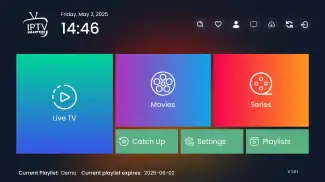
2️⃣ Adjust Security (One-Time)
- Go to System Settings > Privacy & Security
- Scroll to “Allow apps downloaded from” and select “Anywhere”
(If “Anywhere” is hidden, open Terminal and run:sudo spctl --master-disable) - Important: Change this setting back after installation for better security
3️⃣ Launch & Login
- Open the app from your Applications folder
- Click “Add New User” on the welcome screen
- Click on Xtreme Codes API or Player API
4️⃣ Choose Login Method
| Method | What to Enter |
|---|---|
| Xtream Codes (Recommended) | Server URL, Username, Password |
| M3U URL | Playlist link |
- Enter your credentials from xtremehdiptv.site , which we sent you on your mail address after Order
- Click “Add User”
- Wait for channels to load → Done! 🎉
The Xtream Codes method is preferred because it loads channels faster and provides better EPG (TV guide) integration compared to M3U URLs.
🔧 Quick Fixes
| Problem | Solution |
|---|---|
| Login fails | Check credentials, remove extra spaces, verify subscription |
| Buffering | Use Ethernet, restart router, check speed |
| App crashes | Reinstall the app |
| No channels | Contact provider support |
Note: IPTV Smarters is just a media player. Content comes from your Xtreme HD IPTV subscription. For privacy and smoother streaming, consider using a reliable VPN service.
Enjoy your streams! 📺
For subscriptions and support: xtremehdiptv.site
